
How to Set Up Client Systems to Use a Concurrent (Network) License Server
After configuring and starting the license servers, client systems need to be able to connect to the server to obtain licenses when performing comparisons or other operations.
Understanding your license
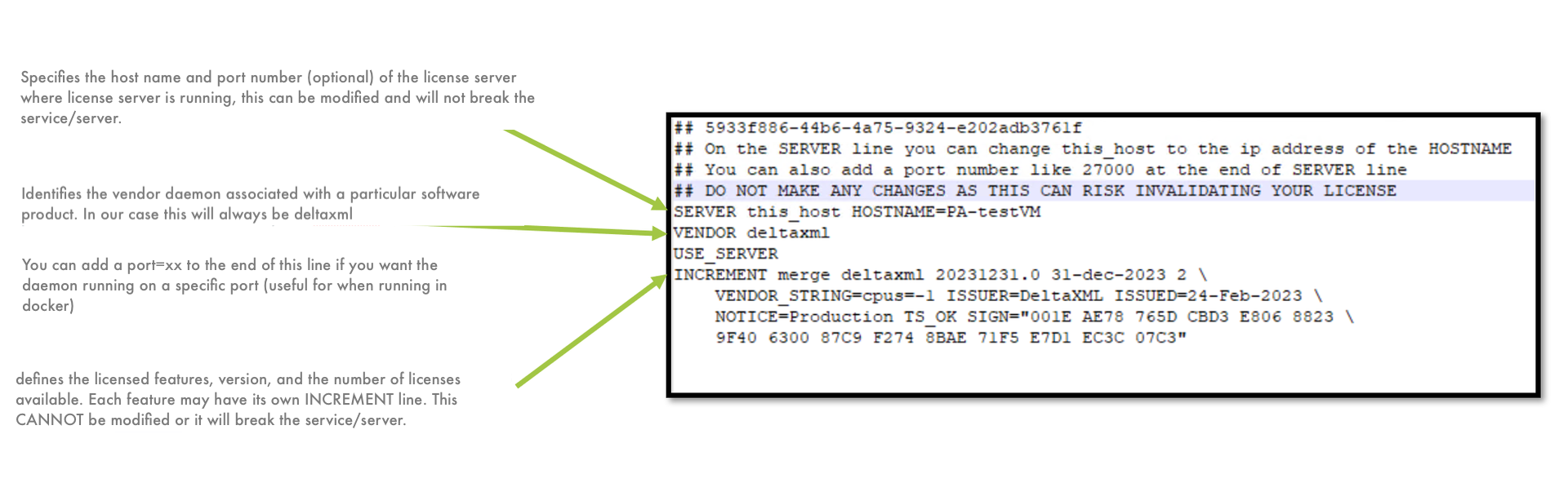
Setting Up Client Systems
-
Copy the license file to your client machine. You can place the license file can be placed in one of the following locations.
-
The same directory as the DeltaNova
.jar. This is typically the directory created when unzipping the release download or a/binsubdirectory. -
The user's home directory.
-
You can specify a directory by calling the API method
setLicenseFile, if you are using the Java API.
-
-
Change
this_hostin the license file so that clients can contact the server. Use an IP address or hostname (simple or fully qualified). When editing, take care to ensure that the second argument on the server line is used to contact the host and the third is thehostidused for locking. For more information on editing the license file, see Editing the License File.
Alternatively, if you are using the Java API, specify the server using the setLicenseServer API method.
-
To ensure the license server is running, you can try to obtain a license.
-
Open a command terminal.
-
Navigate to the product folder.
-
Run the main product jar file with the
licenseargument. The name of the jar file depends on the product being used. For example:
-
$ java -jar deltanova-x.y.z.jar license
This displays the version of the product and the license details. If you observe the license server logs, you can see a checkout followed by an immediate checkin corresponding to the license report.