
Image Comparison
Many document formats provide mechanisms to refer to or include images and possibly other forms of media content in documents. A typical example is the img element in HTML where the src attribute points to an external image resource. Similarly, XML based formats often embed or referenced images using structured elements and attributes, with supported formats including .jpg and .png
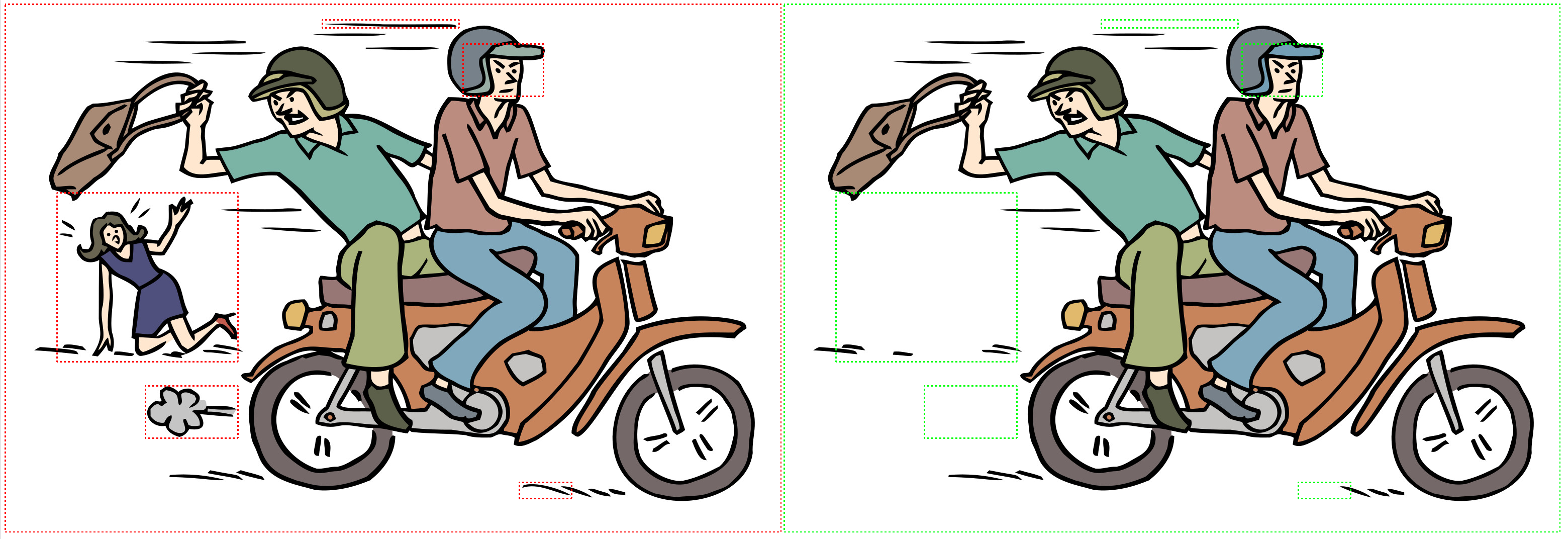
In addition to comparing textual and structural content, this now supports visual comparison of images referenced within XML documents. Using XPath expressions, users can target specific image nodes and perform pixel-level analysis to detect visual differences. The comparison highlights the regions where images differ - such as added, removed, or modified content - using bounding boxes rendered directly on the original image.
Key Highlights
-
XPath-Driven Targeting: select and compare images directly from XML nodes using XPath expressions, enabling precise control over which visual assets are analyzed.
-
Pixel-Level Difference Detection: identifies visual changes such as addition, deletions, and modifications by comparing image content at the pixel level.
-
Bounding Box Visualization: highlights regions of change using bounding box drawn directly on the original image for intuitive inspection.
-
Customizable Bounding Box Colors: User can configure distinct bounding box colors for input A and input B, making it easier to visually distinguish differences between the two sources.
Referencing
Most formats also support the use of both relative and absolute referencing. So for example it is possible to refer to an image using a relative URI:
<img src="diagram1.png"/>
In this case the location of the image is relative to the location of the file containing the image element and src URI.
It is also possible to use an absolute URI, these come in various forms or 'schemes', for example:
<img src="http://www.company.com/images/diagram2.gif" alt="flow diagram"/>
or
<img src="file:///c:/Users/Joe/images/diagram3.png" alt="flow diagram"/>
Comparing Images
Looking solely at an XML file perspective it is possible to determine when the value of an attribute has changed. However a more in depth comparison of referenced images can be performed when:
-
There is access to a filesystem or similar hierarchical store to resolve file URIs.
-
Can read the referenced files to analyze their contents.
With filesystem and similar access it is possible to resolve a relative URI into an absolute URI.
Consider the following example:
-
file1.htmlis located inside the/Users/Joe/Documentsdirectory and contains the following image reference:<img src="images/pic1.png"/> -
file2.htmlis located in the same directory, but contains<img src="../Documents/images/pic1.png"/>
If you are given just the two files without any knowledge of their location, it's only possible to say that the src attribute has changed. However, with the knowledge of where the files are located (Joe's Documents directory) it is possible to resolve the URIs and determine that both src attributes are actually referring to the same file.
The above example demonstrates that image attribute change does not necessarily imply image change. The converse however is also true, it is possible to have an unchanged attribute value where the image does change. This can occur for example where the two xml input files are stored in different locations in the tree (not the same directory) and each has its associated images with local relative references.
To summarize our processing approach:
-
If we don't have access to the filesystem or navigation tree we can only compare attribute values.
-
When we do have tree access, we resolve the references relative to the base of the two input files.
-
When the references resolve to the same location we know the image is the same at that point and the comparison result will contain the resolved absolute path given by the URI from input B document given in the input B document, but with the proviso that when relative references are used the result file should be located in the tree such that the relative references still work.
-
If the absolute references resolve to different locations then the images could be identical copies or they could be different. We perform a pixel-level comparison to determine whether the images are visually identical or contain meaningful differences. If we determine that every pixel is identical we can then say that the images are identical and we only need to provide one of them in the result. If they differ, we extract the regions of change. These differences are visually highlighted using bounding boxes, allowing users to quickly spot added, modified or deleted content. We will report them as changed and provide both image with highlighted changes in the result.
-
We aim to provide a robust and efficient image comparison mechanism that balances accuracy with performance. The system performs pixel-level analysis to detect visual differences between images referenced in XML documents. If two images resolve to different locations, we evaluate them based on their visual content rather than relying solely on metadata or file structure. Here are some implementation notes:
-
We read both image dimensions first (without reading their entire contents) and if they differ we assume that they are different without reading their content.
-
If image access fails due to permission issues or missing resources, the system conservatively assumes the images differ and flags them accordingly.
Running the sample
Download the sample from here: https://bitbucket.org/deltaxml/imagecompare/src
The file README.md file gives instructions on how to run the sample.
Image Configuration
Image comparison can be easily configured using imageConfiguration config in the DCP. This includes the following elements:
-
isEnabled- set to true or false to enable/disable binary image comparison and is true by default. -
imageXpath- XPath to an attribute pointing to image location, specified on an image element. -
imageGranularity- sets the ImageComparisonGranularity at which the differences between two images will be represented. Default value is detailed-adjacent. -
imageInputAMarkupStyle- sets the Input A image markup style used for image comparison results. The default value is red. -
imageInputBMarkupStyle- sets the Input B image markup style used for image comparison results. The default value is green. -
outputRefForm- The result document may reside in a different location to the inputs. To better see where the result is generated and see any image changes, hrefs can be changed to absolute locations. By default the href value is taken from the source document. -
outputImageRefFavourSourceDoc- When images are the same, choose whether to use the A or B source in the output. The default value is B.
<standardConfig>
    <imageConfiguration>
        <isEnabled literalValue="true"/>
        <imageXpath literalValue="*:img/@src"/>
        <imageGranularity literalValue="adjacent" />
        <imageInputAMarkupStyle literalValue="#0af0a3" />
        <imageInputBMarkupStyle literalValue="pink" />
        <outputRefForm literalValue="source"/>
        <outputImageRefFavourSourceDoc literalValue="B"/>
    </imageConfiguration>
</standardConfig>
Image comparison is enabled by default but if no XPath is specified for imageXpath then it will not trigger.
To configure in the Java API use the following configuration:
dc.getImageConfiguration().setEnabled(true);
dc.getImageConfiguration().setImageXPath("*:img/@src");
dc.getImageConfiguration().setImageComparisonGranularity(ImageComparisonGranularity.ADJACENT);
dc.getImageConfiguration().setInputAMarkupStyle("#0af0a3");
dc.getImageConfiguration().setInputBMarkupStyle("pink");
If svg comparison is enabled then svg images will be compared using svg comparison otherwise they will be compared using pixel-level image comparison.
Example:
The following comparison was performed using the default image configuration.
documentA.xml
<!DOCTYPE html>
<html xmlns="http://www.w3.org/1999/xhtml">
  <head>
    <title>Input A Image Test</title>
  </head>
  <body>
    <img src="./1.jpg" alt="Input A"/>
  </body>
</html>
documentB.xml
<!DOCTYPE html>
<html xmlns="http://www.w3.org/1999/xhtml">
  <head>
    <title>Input B Image Test</title>
  </head>
  <body>
    <img src="./2.jpg" alt="Input B"/>
  </body>
</html>
result.xml
<?xml version="1.0" encoding="UTF-8"?><!DOCTYPE html >
<html xmlns="http://www.w3.org/1999/xhtml" xmlns:deltaxml="http://www.deltaxml.com/ns/well-formed-delta-v1" xmlns:dxx="http://www.deltaxml.com/ns/xml-namespaced-attribute" xmlns:dxa="http://www.deltaxml.com/ns/non-namespaced-attribute" deltaxml:deltaV2="A!=B" deltaxml:content-type="full-context" deltaxml:version="2.0">
  <head deltaxml:deltaV2="A!=B">
    <title deltaxml:deltaV2="A!=B">Input <deltaxml:textGroup deltaxml:deltaV2="A!=B"><deltaxml:text deltaxml:deltaV2="A">A</deltaxml:text><deltaxml:text deltaxml:deltaV2="B">B</deltaxml:text></deltaxml:textGroup> Image Test</title>
  </head>
  <body deltaxml:deltaV2="A!=B">
    <img deltaxml:deltaV2="A" src="/Users/akash.nakkawar/dev/core/deltaxml-jar/target/test-classes/black-box/data/com/deltaxml/cores9api/blackbox/ImageTestData/gmail/1_A-output.png" alt="Input A"/>
    <img deltaxml:deltaV2="B" src="/Users/akash.nakkawar/dev/core/deltaxml-jar/target/test-classes/black-box/data/com/deltaxml/cores9api/blackbox/ImageTestData/gmail/2_B-output.png" alt="Input B"/>
  </body>
</html>
Screenshots of the above comparison result:
Limitations:
-
Pixel-Level only: The comparison is based solely on pixel data and does not account for semantic meaning, object recognition, or visual context.
-
Format Dependency: Only supported image formats (e.g., .png and .jpg) can be compared.
-
No Movement Tracking: This feature does not detect object movement between images. Changes are treated as static differences.
-
Failure Assumption: If image access fails due to permissions, missing files, or invalid URIs, the system only compares attribute values.
-
XPath Accuracy: Image comparison depends on valid XPath expressions. Incorrect XPath queries may result in missed comparisons.
-
Dimension Mismatch Handling: Images must have the same dimensions to be compared accurately. If dimensions differ, the system treats them as entirely different and highlights each image with a bounding box, without identifying specific pixel-level changes.