
Output Formats Overview
The direct Compare and Merge output uses the Delta format. It preserves the structure and content of the original inputs, with annotations added to describe the differences. This is the standard output, but the following formats can also be produced:
-
Tracked changes markup for the ArborText, FrameMaker, Oxygen, and XMetaL XML editors (Document Comparator only)
-
HTML difference reports in a side-by-side or folding rendering, called a DiffReport
-
Custom output formats, created by adding an XSLT output filter to perform a final transform on the Delta format
Direct Compare Output
The direct output from Compare is the Delta — the base XML output for the Pipelined Comparator, the Document Comparator, and the Data Comparator. By default the Delta includes all content, including unchanged content. A changes-only (patch) output is also available; see Using Deltas for XML Versioning
The Delta
The Delta output uses the DeltaV2 format. This format is designed to be compact whilst keeping the code that processes it clean and efficient. Compare uses version 2.0 of the DeltaV2 format by default; if the Document Comparator is used with marked-up formatting elements, it uses version 2.1. Version 2.1 is a superset of 2.0, with extensions to represent overlapping XML hierarchies.
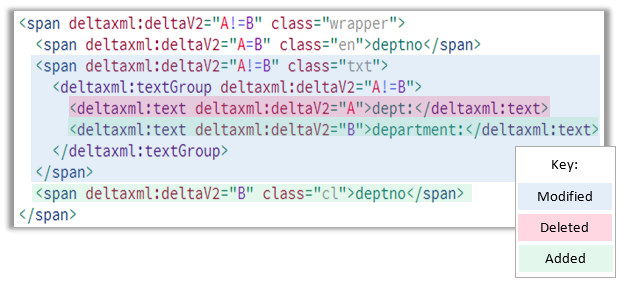
At its simplest, the DeltaV2 format represents the A and B documents in a single document. Compare adds deltaxml:deltaV2 attributes (in the DeltaXML namespace) to every element where it finds differences. The deltaV2 attribute may hold one of the following values: A, B, A=B, or A!=B. The A or B represents the document source, and the = or != separator indicates whether the matching source elements are the same or different. For example, A!=B means the element exists in both documents but its content differs, while A means the element appears only in document A. Extra elements in the DeltaXML namespace represent modified text or attribute nodes.
See Delta Output Format Overview for full reference documentation.
Document Comparator Formats
Tracked Changes
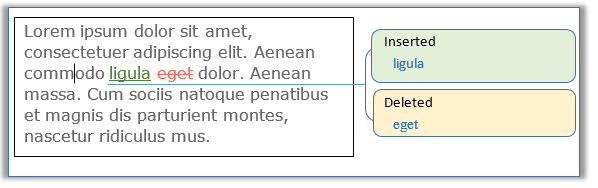
Many XML editors support a tracked changes feature incorporated into an Author Mode with a WYSIWYG view. Compare can represent its output as tracked changes in supported tools, so that you can accept or reject detected changes and make further edits within your chosen editor.
The Document Comparator API provides a setResultFormat method on the OutputFormatConfiguration object to produce output conforming to the tracked changes format for the following XML editors:
-
Oxygen XML Editor
-
PTC ArborText
-
XMetaL
-
Adobe FrameMaker
The following table summarises which change types each tracked changes format supports:
|
Change type |
ArborText |
FrameMaker |
Oxygen |
XMetaL |
|---|---|---|---|---|
|
Elements |
Yes |
Yes |
Yes |
Yes |
|
Text |
Yes |
Yes |
Yes |
Yes |
|
Attributes |
Yes |
No |
Yes |
No |
|
Comments |
Yes |
Yes |
Yes |
Yes |
|
Processing instructions |
Yes |
Yes |
Yes |
Yes |
|
Table row and cell changes |
Yes |
Pushed down to cell content (configurable) |
Yes |
No (configurable push-up/ignore) |
|
Changes within CDATA sections |
Whole section marked deleted + inserted |
Whole section marked deleted + inserted |
Marked by PI sequence with character counting |
Whole section marked deleted + inserted |
ArborText Tracked Changes
When you use ArborText Tracked Changes Markup, the output is an ArborText tracked-change version of the document. Assuming all changes are accepted or rejected, the resulting document is a valid XML document.
The generated tracked changes use three tracked change elements:
|
Element |
Purpose |
|---|---|
|
|
Deleted content |
|
|
Attribute modification (outside a table) |
|
|
Inserted content |
Changes within comments and CDATA sections result in the whole of the old version of the text being marked as deleted and the whole of the new version being marked as inserted.
DocumentComparator dc = new DocumentComparator();
dc.getOutputFormatConfiguration().setResultFormat(ResultFormat.ARBORTEXT_TC);
Adobe FrameMaker Tracked Changes
The FrameMaker Tracked Changes Markup output format is a valid XML document that includes annotations to represent changes displayed in the FrameMaker Editor. The format uses XML processing instructions and comments to mark additions and deletions.
By default, FrameMaker pushes changes to table rows and cells down to the cell content level. The FrameMakerTrackChangesTableChangeMode parameter controls this behaviour.
OutputFormatConfiguration formatConfig = new OutputFormatConfiguration();
formatConfig.setResultFormat(ResultFormat.FRAMEMAKER_TC);
Oxygen Tracked Changes
When you use Oxygen Tracked Changes Markup, the output is an XML document supported by the Oxygen Editor and Author products. This format uses processing instructions to identify changes — deleted content is contained within the processing instruction, and inserted content is sandwiched between two processing instructions marking the start and end of the insertion. Removing or ignoring the processing instructions has the effect of accepting all changes.
The format handles comments and CDATA sections specially: a sequence of processing instructions immediately following the element identifies each change, marking its location using a character counting technique.
To see attribute changes, set ModifiedAttributeMode to CHANGE (this is the default when the output format is OXYGEN_TC).
OutputFormatConfiguration formatConfig = new OutputFormatConfiguration();
formatConfig.setResultFormat(ResultFormat.OXYGEN_TC);
XMetaL Tracked Changes
When you use XMetaL Tracked Changes Markup, the output is an XML document that uses processing instructions to identify changes, in a similar manner to the Oxygen format.
Changes within CDATA sections are moved to the CDATA section level as a whole — any textual change results in the old version of the whole CDATA section being marked as deleted and the whole of the new version being marked as inserted.
The XmetalTrackChangesTableChangeMode parameter controls what happens when row or cell level table changes are present:
-
Default — changes are pushed down to the cell content level.
-
Push up — changes are pushed up to the table level (old and new versions of the whole table are tracked).
-
Ignore — all changes within a table are ignored.
OutputFormatConfiguration formatConfig = new OutputFormatConfiguration();
formatConfig.setResultFormat(ResultFormat.XMETAL_TC);
Tracked Changes Configuration Parameters
When ResultFormat is any of the tracked changes representations, the following parameters apply. For full details see OutputFormatConfiguration.
|
Parameter |
Description |
|---|---|
|
|
The author name embedded into the generated insertion and deletion processing instructions. Default: |
|
|
A |
|
|
The options for processing elements that were flattened in the inputs. |
The following example sets the author and date on any tracked changes output:
OutputFormatConfiguration formatConfig = new OutputFormatConfiguration();
formatConfig.setResultFormat(ResultFormat.OXYGEN_TC);

String author = "New Author";
formatConfig.setTrackChangesAuthor(author);

Calendar newDate = Calendar.getInstance();
newDate.add(Calendar.DAY_OF_MONTH, 1);
formatConfig.setTrackChangesDate(newDate);
Supplementary Output Formats
These output format filters are included with the Compare distribution. They transform the Delta output within the comparison pipeline immediately prior to serialization.
HTML Difference Reports
Both DiffReport renderings require JavaScript in the browser.
HTML5 Side-by-Side Report (diffreport-sbs)
This view presents the comparison result of the raw XML of the input file versions rendered alongside each other. A toolbar provides up/down buttons for highlighting each change.
In the Pipelined Comparator, generate this view using the built-in DXP configuration diffreport-sbs from the command line or GUI. Alternatively, generate it from the Compare API using the dx2-deltaxml-sbs-folding-html.xsl stylesheet as the final output filter.
For the Document Comparator, use the DCP configuration doc-diffreport-sbs, or add the XSLT filter dx2-deltaxml-sbs-folding-html.xsl as a filter step to the OUTPUT_FINAL extension point:
DocumentComparator dcr = new DocumentComparator();
FilterStepHelper fsh = dcr.newFilterStepHelper();
FilterChain fChain = fsh.newFilterChain();
FilterStep fsSBS = fsh.newFilterStepFromResource(
    "xsl/dx2-deltaxml-sbs-folding-html.xsl", "side-by-side");
fChain.addStep(fsSBS);
dcr.setExtensionPoint(ExtensionPoint.OUTPUT_FINAL, fChain);
HTML Folding Report (diffreport)
This view shows XML differences interleaved within a single view of the XML. The colour of the rendered XML indicates the type of change — blue for modified, green for added, red for deleted. You can fold or unfold each element node by pressing the icon to the left of the start tag. A toolbar and differences list make it easier to navigate changes in large documents.
With the Pipelined Comparator, generate the folding view using the built-in DXP configuration diffreport from the command line or GUI.
For the Document Comparator, use the DCP configuration doc-diffreport, or add the associated XSLT stylesheet as a filter step to the final output extension point. See Folding DiffReport with DCP.
XML Diff and Patch Output
The Compare comparators may be configured to output either a full context delta (the default) or a changes-only delta. When the Pipelined Comparator is used, the changes-only format may be used to recreate document B from document A — useful in version control systems and similar scenarios.
See Using Deltas for XML Versioning for a worked example.