
Map Processing in DITA Compare
This topic describes how DITA Compare handles map-level comparisons, including the Map File and Map Topicset comparison types.
Map File comparison
A Map File comparison directly compares two DITA map files. This compares the map's own structure and attributes — topicref elements, relationship tables, metadata — without following any references to topic files or submaps.
The output is a single DITA map file marked with the chosen output format.
Map Topicset Comparison
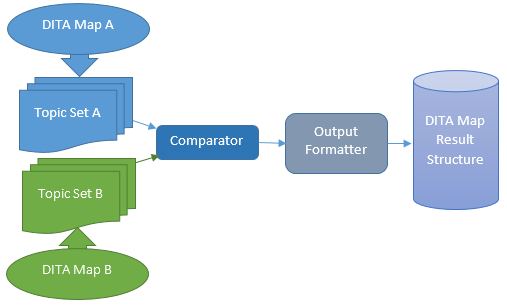
This comparison type involves the comparison of a set of all the topics referenced from the supplied top-level DITA maps. Here's a high-level diagram showing the comparison:
Changes within topics are marked up using the Output Format specified at the time the comparison is invoked. In the example code (below), the OXYGEN_TCS (Oxygen Tracked Changes) output format is used.
In the example above, the MapResultStructure enum type UNIFIED_MAP is used to set the result structure, whilst MapResultOrigin.B_DOCUMENT specifies that the result should be shown as modifications to the second map (map B) passed as an argument to the compare method.
Update Modes: 'Map Copy' vs 'In Place'
In these map comparison scenarios, all topics referenced by each input map are copied to newly created container directories for their respective maps. It is therefore the copies of the DITA map and topic files that are annotated (in the 'Folder B' copy by default) to show the differences found. Whilst this Map Copy approach is inherently safer because the original file copies are left untouched, an In Place map comparison mode is also provided.
An In Place comparison annotates the files (in 'Folder B' by default) in their original location, but creates backup copies at the same location with a 'bak' suffix. This mode may be useful if you want to perform a comparison on your own copies of the two input maps, or if the input maps are under version control in a repository. To invoke an In Place comparison from the API, the compareInplace method is used instead of the compare method, from the command-line, the output destination path is simply substituted with the 'inplace' string.
Result Structures
When performing a map comparison, Dita Compare provides a choice of result structures: Topic Set, Map Pair and Unified Map (described in the Map Topicset Result section of the Reference). The map comparison scenarios outlined here use the same input maps but show each of the three available result structures.
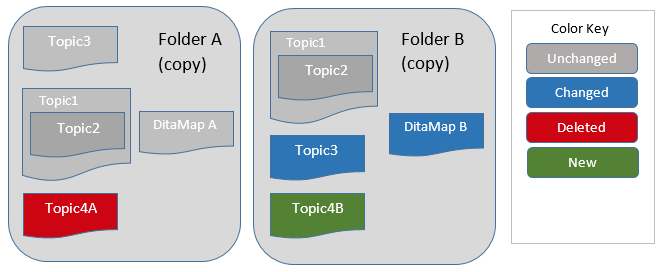
The diagram below shows representations of the two DITA maps used as inputs to the comparison for each of the following comparison scenarios included in this section.
Topic Set (Result Structure)
In this scenario, three arguments are supplied to the compare method: the first two arguments are input locations referencing the top-level ditamap files for the DITA map versions, the final argument is the output destination, which should be an empty directory. The only other setting for this scenario is the MapResultStructure property which is set to TOPIC_SET.
Note: A number of other configurations control how the result of a map comparison is represented, identified by the 'map-' prefix in their name, a full description of these can be found in configuration schema.
The diagram below shows that, for this map comparison, the input directories, labelled Folder A and Folder B are copied to the supplied output directory.
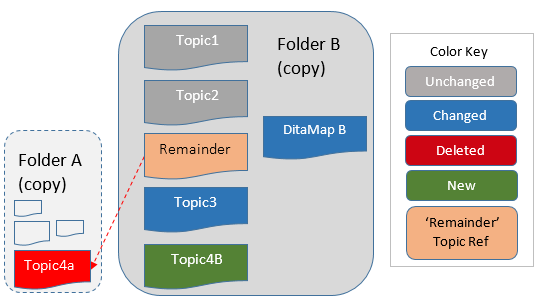
By default, all changes are described in the result in terms of modifications to the second input map supplied, DitaMap B in this case. The map and topics in the Folder B copy are arranged and annotated to describe the map comparison result as outlined below:
-
Topic references in DitaMap B show how topics in Folder B align with those in Folder A
-
Each topic in the Folder B copy shows any differences to the corresponding Folder A version
-
Topic references in DitaMap B are flattened so all topic references occur at the top-level.
-
Dita Compare orders topic references, where possible, so they align with those in the DitaMap B original
-
References to deleted topics (not referenced in the DitaMap B original) link to the copy in the Folder A copy
The DITA Map Result File (Topic Set)
The ditamap file in Folder B uses rev and status attributes to describes the differences found in the referenced topics, the XML for this is shown below:
<!DOCTYPE map
  PUBLIC "-//OASIS//DTD DITA Map//EN" "map.dtd">
<map>
   <topicref href="../topics/topic1.dita" status="unchanged"/>
   <topicref href="../topics/topic2.dita" status="unchanged"/>
   <topicref href="../../_a-0-file-/topics/topic4A.dita"
             rev="deltaxml-delete"
             status="deleted"/>
   <topicref href="../topics/topic3.dita" status="changed"/>
   <topicref href="../topics/topic4B.dita" rev="deltaxml-add" status="new"/>
</map>
Map-Pair (Result Structure)
This scenario is the same as the previous with one exception: a Map Pair result is specified for the output. This is done by setting the MapResultStructure property to MAP_PAIR.
The result of this map comparison is shown below.
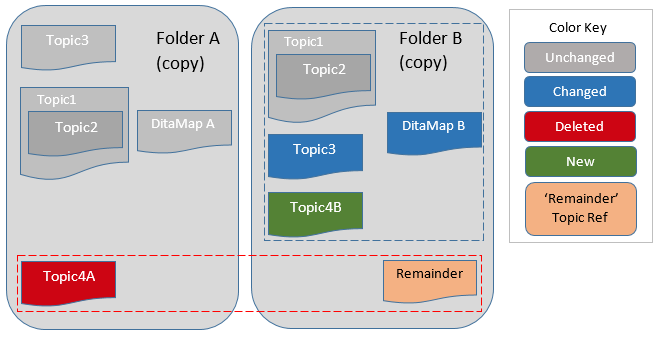
This diagram shows the DITA map labelled DitaMap B only references topics in Folder B, but there's now an additional Remainder DITA map. This Remainder DITA map references all topics referenced in the DitaMap A map, but not found in DitaMap B, effectively the deleted topics.
This Map Pair structure has a benefit over a Topic Set in that it preserves the hierarchy of topic references, as illustrated by Topic2 still being nested within Topic1, the downside is that deleted topics can not be seen in the context of DitaMap B, they can only be viewed from the Remainder map.
The DITA map result file (Map Pair)
<!DOCTYPE map PUBLIC "-//OASIS//DTD DITA Map//EN" "map.dtd">
<map xmlns:ditaarch="http://dita.oasis-open.org/architecture/2005/">
  <title>Simple DITA Map Sample</title>
  <topicref href="../topics/topic1.dita" status="unchanged">
    <topicref href="../topics/topic2.dita" status="unchanged"/>
  </topicref>
  <topicref href="../topics/topic3.dita" status="changed"/>
  <topicref href="../topics/topic4B.dita" rev="deltaxml-add" status="new"/>
</map>
Unified Map (Result Structure)
This scenario is the same as the previous with one exception: a Unified Map result is specified for the output. This is done by setting the MapResultStructure property to UNIFIED_MAP.
The result of this map comparison is shown below:
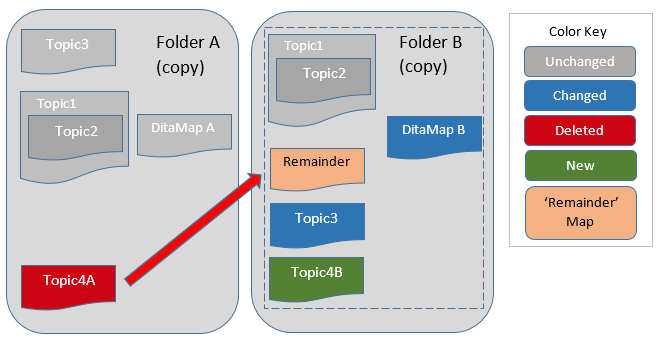
This diagram shows the DITA map labelled DitaMap B references topics in Folder A and Folder B. The topicref elements in DitaMap A referencing topics not referenced in DitaMap B are adjusted and inserted into DitaMap B, but marked as deletions.
The DITA Map Result File (Unified Map)
<!DOCTYPE map PUBLIC "-//OASIS//DTD DITA Map//EN" "map.dtd">
<map xmlns:ditaarch="http://dita.oasis-open.org/architecture/2005/">
  <title>Simple DITA Map Sample</title>
  <topicref href="../topics/topic1.dita" status="unchanged">
    <topicref href="../topics/topic2.dita" status="unchanged"/>
  </topicref>
  <topicref href="../../_a-0-file-/topics/topic4a.dita"
            rev="deltaxml-delete" status="deleted"/>
  <topicref href="../topics/topic3.dita" status="changed"/>
  <topicref href="../topics/topic4B.dita" rev="deltaxml-add" status="new"/>
</map>
This Unified Map structure aspires to combine the benefits of the Topic Set and Map Pair result structures. So it preserves the hierarchy of topic references in DitaMap B and attempts to insert missing DitaMap A topic references (and their hierarchy also) as close as possible to the DitaMap B location where they are found to be missing.
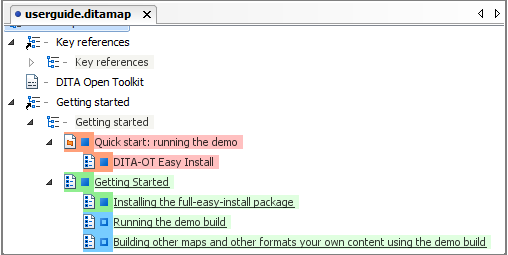
This result structure is most suitable for cases where the structure of the two DitaMaps (A and B) is broadly similar, so missing topic references can be inserted close to their original position without compromising the original structure. This diagram shows a oXygen XML Editor screenshot of a Unified Map comparison result structure:
Progress monitoring
For large map comparisons the API provides a callback/event mechanism to monitor progress. In Java, implement the Listener interface; in .NET, subscribe to the available events. See the API documentation for details.