
DeltaNova Product Overview
DeltaNova is the gold standard content and data change management solution, empowering you with multi-format change intelligence at enterprise scale. Replace manual checks with actionable change intelligence, understand impact faster, collaborate with confidence, and deliver accurate content and data at speed across your enterprise workflows. Designed for teams working at the intersection of structured authoring, data management, and publishing pipelines, DeltaNova gives you precise control over how content and data is compared, merged, and validated at every stage of its lifecycle.
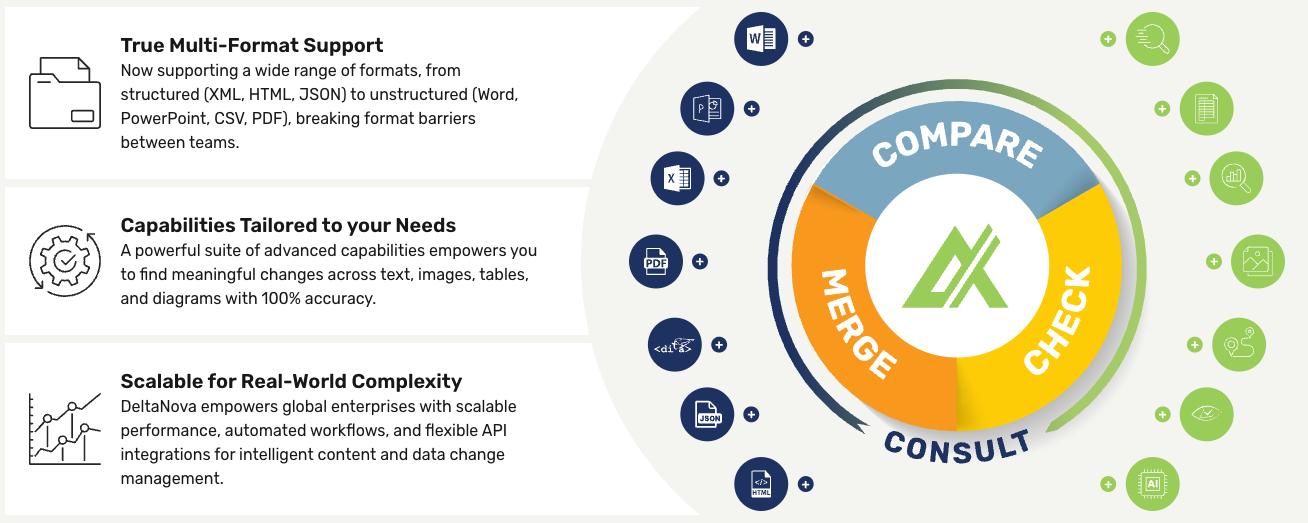
What DeltaNova Does
At its core, DeltaNova addresses three fundamental challenges in content and data management:
Compare. DeltaNova's comparison engine provides a powerful solution to identify and process the differences between any two files - whether structured or unstructured content or data. Changes are recorded in an delta file or a format specific output that has the same look and feel as the original files, making it easy to understand and process using standard tools. The delta can include changes only, or changes alongside unchanged data, and the entire comparison can be pre- and post-processed through customisable XSLT filter pipelines.
Merge. DeltaNova's merging capability allows you to manage the complexities that arise when multiple authors work, either concurrently or sequentially, on the same document and merging the resulting document variants or monitoring their differences as required. Two broad scenarios are supported: concurrent merge, useful when one ancestor document has been amended by a number of editors at the same time, and sequential merge, useful when each version is a derivative of the previous one.
Check. DeltaNova's checking capability gives you assurance that document content converted to a different format is intact and that nothing has been lost in the conversion. This is an essential quality assurance check for all high-integrity or audited processes where document formats are changed. A practical example - DeltaNova Check can verify that the content of a DITA document is the same as the Word file from which it was created, whether that process was automatic or manual.
Capabilities
DeltaNova delivers a comprehensive set of built-in base capabilities, with additional advanced capabilities available to extend functionality as needed. Ecosystem packages for Microsoft Office and PDF comparison solutions further enhance the platform's capabilities.
|
Capability |
Base |
Advanced |
|
Automated Conflict Detection |
✓ |
|
|
Change Conflict Management |
✓ |
|
|
Comprehensive Change Tracking |
✓ |
|
|
Contextual Change Detection |
✓ |
|
|
Flexible Output Processor |
✓ |
|
|
Ignore Structure |
✓ |
|
|
Integration-Friendly API |
✓ |
|
|
MathML Comparison |
✓ |
|
|
Performance Optimisation |
✓ |
|
|
Process Automation |
✓ |
|
|
Unordered Content & Data Handling |
✓ |
|
|
Visual Change Markup |
✓ |
|
|
Word-Level Change Detection |
✓ |
|
|
Collaborate with Multiple Editors and Reviewers |
✓ |
|
|
Full Scope Change Detection |
✓ |
|
|
High Performance and Scalability |
✓ |
|
|
Ignore Changes |
✓ |
|
|
Intelligent Matching Algorithms |
✓ |
|
|
Customisable Comparison Rules |
✓ |
|
|
Character-Level Change Detection |
|
✓ |
|
Table Comparison |
|
✓ |
|
Diagram Comparison |
|
✓ |
|
Flexible Output Formats |
|
✓ |
|
Image Comparison |
|
✓ |
|
Whitespace Handling |
|
✓ |
|
Move Tracking & Tagging |
|
✓ |
|
Grammar Specific Processing |
|
✓ |
|
Merge Functionality (Concurrent) with Multi-Version Change Tracking |
|
✓ |
|
Merge Functionality (Sequential) with Multi-Version Change Tracking |
|
✓ |
|
Merged Output Flexibility |
|
✓ |
|
Customisable Merge Rules |
|
✓ |
|
Table Merging |
|
✓ |
Key Features
Supported Formats
DeltaNova offers extensive and continuously growing support for industry-standard content and document formats, including any XML, HTML, XHTML, DITA, DocBook, DOCX, PPTX, and PDF. By supporting both structured and unstructured content formats, DeltaNova enables efficient content authoring, conversion, validation, transformation, and multi-channel publishing workflows.
Intelligent XML Comparison
DeltaNova can find all the differences between any two XML files, apply changes to convert an A file into the B version (a diff patch), or undo changes to revert a B file back to the A version. Document-focused comparisons include word-by-word text processing, special handling for formatting elements, HTML and CALS table structure awareness, move detection for uniquely identifiable elements, and support for comparing embedded MathML and SVG.
Multi-way Merge with Conflict Resolution
DeltaNova supports N-way concurrent merge, three-way concurrent merge, and N-way sequential merge. Changes detected during a merge can be resolved in an external process using rule-based approaches or interactively in an authoring or reviewing tool; for more complex requirements involving more than three input files, a simple rule-based resolver can be configured and run within the merge process itself. Integration with version control systems such as Git and Mercurial is also supported.
Cross-format Conversion Validation
DeltaNova Check finds all content differences between a document represented in two formats, reports whether a conversion has been successful or has introduced changes, and outputs an HTML change report with a summary of the results. It accepts single-file XML formats as well as multi-file Microsoft Word and DITA documents.
Flexible Integration
All three capabilities are accessible via a Java API, a REST API, and a command-line tool, making DeltaNova straightforward to embed in content management systems, publishing pipelines, and CI/CD workflows.
Who It's For
DeltaNova is built for documentation teams, data management teams, who need dependable, automatable answers to questions: What changed? How it has changed ? How do we reconcile those changes? Did our conversion process preserve everything it should have? By consolidating Compare, Merge, and Check capabilities under a single product, DeltaNova removes the integration overhead of managing these capabilities separately and provides a consistent API surface across the entire content intelligence workflow.