
Anonymising Data Files Before Sending to Support
Before You Begin
-
Download the obfuscator from https://bitbucket.org/deltaxml/support-obfuscator/.
-
Identify the XML input files producing unexpected results.
-
Gather any ancillary files (filters, XSL, catalog files) used in the comparison or merge.
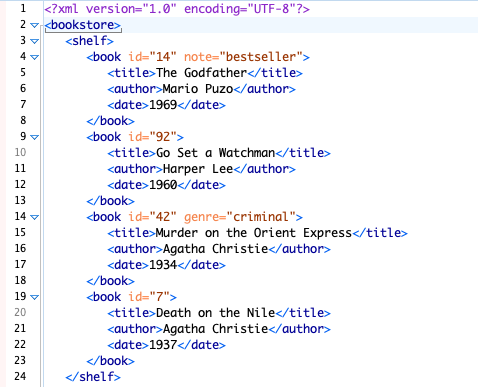
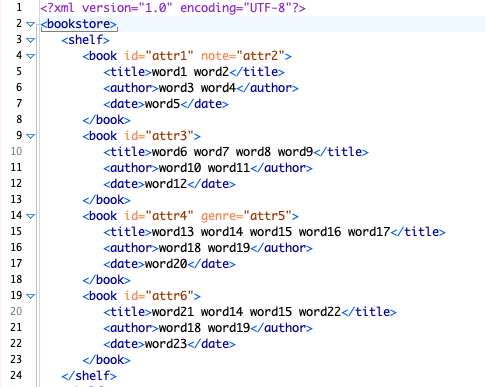
Only text node content is obfuscated. Element names, attribute names, and document structure are preserved so the support team can understand the schema.
What Anonymisation Looks Like
Figure - Original (unobfuscated) XML containing real personal data - unsafe to share vs Same document after obfuscation - text values replaced, element names intact, safe to share
Procedure
-
Contact DeltaXML support via the Customer Support Portal to describe the problem. Pre-sales enquiries use the Evaluation Support Portal.
-
If file submission is needed, run the anonymiser tool against your input files following the repository README instructions.
-
Zip the resulting
.obsfile(s) together with any ancillary files. -
Upload the zip to the support portal ticket by drag-and-drop.
-
When support returns a result file, run the de-anonymiser (
deanonymiser) to restore original content and verify the fix. -
Provide feedback to support to confirm resolution or escalate.
Key Points
-
The anonymiser creates a key map stored only on your computer — only you can run the de-anonymiser.
-
The de-anonymiser can be applied to any file previously anonymised using this process.
-
Customer Support Portal: https://deltaxml.atlassian.net/servicedesk/customer/portal/2