
DXP Pipeline Overview
The use of Processing Pipelines allows complex systems for XML processing to be composed from a number of smaller, simpler components. The underlying concepts were initially developed with the SAX parsing and filtering APIs and have subsequently been adopted by XSLT and other standards. For further information and background on JAXP and SAX event pipelining, refer to Powering Pipelines with JAXP.
What is DXP?
The DXP (Delta XML Pipelines) language defines a processing pipeline in XML. DXP describes XML processing pipelines to prepare data before a DeltaXML comparison and to process data after comparison. It is an XML language and can be used by anyone familiar with XML data. It does not require any knowledge of Java programming.
DXP is not a general purpose XML pipelining language, although it is optimized for pipelines containing a DeltaXML Comparator. Unlike general purpose pipelining languages, there is no mechanism for specifying the location of the two input sources or documents or to specify where the pipeline result will be located or produced. With DXP, these are capabilities of the tool into which DXP has been embedded.
DXP defines pipelines for the Pipelined Comparator component in XML Compare, it is supplemented by a similar pipeline language called DCP, used to define pipelines for the Document Comparator component.
DXP can also be considered a tool extension language. The ability to embed DXP processing is also available for you to use in your applications. The com.deltaxml.core.DXPConfiguration class is provided to include DXP capabilities in a wide range of Java applications. This will simplify configuration and enable flexibility in the use of the DeltaXML Comparator.
Summary of DXP
-
DXP is a tool customization language, not a general purpose XML pipelining language.
-
DXP is a data-driven way of constructing a
PipelinedComparatorobject which can then be used by a Java program. -
Using DXP is much simpler than JAXP programming, but a small number of JAXP capabilities are not available in DXP.
The Pipeline Model
This diagram of an example pipeline introduces the concepts described in this section.
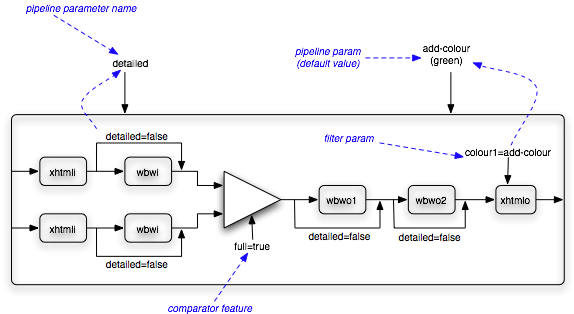
At the centre of a pipeline is a comparator (the triangle), the inputs to the comparator are processed by an ordered sequence of one or more input filters (the rectangles) and the comparator output is also fed through a sequence of filters. Any particular filter may be optional, indicated by the bypass arrow in the diagram. This optionality is controlled by a boolean pipeline parameter, named detailed in the example. When detailed has the value false, four of the filters are bypassed.
The diagram also illustrates a comparator feature, called full. For this pipeline a full delta (which includes the unchanged data) is always required, so a literal value of true is always used.
The final filter in the pipeline has a parameter called colour1, the value of this parameter affects the HTML/CSS colour used to represent certain types of changes. You can specify the colour, by setting a pipeline parameter. However, if you choose not to do this, then the default parameter colour of green is passed to the filter.
The text of this pipeline is included in the following example. It may not make complete sense at this point, details of the features and concepts will be described in later sections of this document.
Example 1. DXP for example pipeline
<!DOCTYPE comparatorPipeline SYSTEM "dxp.dtd">
<comparatorPipeline id="xhtml" description="XHTML Comparison" >
  <pipelineParameters>
    <booleanParameter name='detailed' defaultValue="true"/>
    <stringParameter name='add-colour' defaultValue="green"/>
  </pipelineParameters>
  <inputFilters>
    <filter>
      <resource name="xhtmli.xsl"/>
    </filter>
    <filter if="detailed">
      <class name="com.deltaxml.pipe.filters.WordByWordInfilter"/>
    </filter>
  </inputFilters>
  <outputFilters>
    <filter if="detailed">
      <class name="com.deltaxml.pipe.filters.WordByWordOutfilter1"/>
    </filter>
    <filter if="detailed">
      <class name="com.deltaxml.pipe.filters.WordByWordOutfilter2"/>
    </filter>
    <filter>
      <resource name="xhtmlo.xsl"/>
      <parameter name="colour1" parameterRef="add-colour"/>
    </filter>
  </outputFilters>
  <comparatorFeatures>
    <feature name="http://deltaxml.com/api/feature/isFullDelta" literalValue="true"/>
  </comparatorFeatures>
</comparatorPipeline>
Chains of Filters
The elements inputFilters, input1Filters, input2Filters and outputFilters specify chains of filters within a comparatorPipeline.
Example 2. DXP Grammar for Pipelines and Filters
<!ELEMENT comparatorPipeline (fullDescription?, pipelineParameters?,
          (inputFilters | (input1Filters?, input2Filters?))?, outputFilters?,
         outputProperties?,outputFileExtension?,
         parserFeatures?, comparatorFeatures?)>
<!ATTLIST comparatorPipeline
          id CDATA #REQUIRED
          description CDATA #REQUIRED>
<!ELEMENT inputFilters (filter+)>
<!ELEMENT outputFilters (filter+)>
Both of the XML inputs to a Comparison are passed through lists of input filters. These filters can add, remove or change information as data passes through them. Each filter operates by modifying a Stream of SAX events (or callbacks to an SAX ContentHandler). The operation of these filters can be defined using Java or XSLT. The input filters can be symmetrical (the same filters for each input) through the use of inputFilters or asymmetrical with the separate input1Filters and input2Filters elements used to specify the filters for each input.
Similarly a sequence of filters can be applied to the output of the comparator. These filters could be designed to operate in conjunction with certain input filters (e.g. Word-by-word or XHTML) or be stand-alone filters to clean up the output or generate a report showing changes.
Pipeline Parameters
Often the operation of a pipeline should be influenced by the user. Rather than construct similar pipeline definitions, it may be more convenient and better practice to parameterize the pipeline.
Example 3. DXP Grammar for Pipeline Parameters
<!ELEMENT pipelineParameters (booleanParameter | stringParameter)+>
<!ELEMENT description (#PCDATA)>
<!ELEMENT booleanParameter (description?)>
<!ATTLIST booleanParameter
          name CDATA #REQUIRED
          defaultValue (true|false) #REQUIRED>
<!ELEMENT stringParameter (description?)>
<!ATTLIST stringParameter
          name CDATA #REQUIRED
          defaultValue CDATA #REQUIRED>
Here are some examples of how pipeline parameters could be used.
-
Selecting the colours used to report differences in an output report. Typically green is used to show new content and red deleted content, but you may require control specific to your needs/environment.
-
Selecting the option of input normalization. For certain applications, you may choose to ignore the effects of input whitespace, used for indentation and other purposes, while others may be particularly interested in whitespace changes.
Parameters of a pipeline are similar to the formal parameters of a programming language method or function.
These formal parameters allow the environment or system which is running the pipeline to query their values/setting from the user and then pass them to the pipeline. The application invoking the pipeline can give you information about the parameters and/or a means to specify their values.
Parameter Types
Two types of parameter are supported, boolean parameters and string parameters. They need to be defined with a default value, for the case when you do not specify their values. Using our previous example, the first part of a pipeline definition looks like this:
Example 4. Parameter example
<comparatorPipeline description="Differences Report" id="diffrep">
  <pipelineParameters>
    <booleanParameter name="normalize_whitespace" defaultValue="false"/>
    <stringParameter name="delete_colour" defaultValue="red"/>
    <stringParameter name="add_colour" defaultValue="green"/>
  </pipelineParameters>
Our model of parameters here is much simpler than, for example, that provided by XSLT processors which often allow Java objects to be passed as parameters and then converted into appropriate XSLT types.
Use of Parameters
-
To pass values into filters in order to control their operation.
-
To control the optionality of pipeline stages using boolean (but not string) parameters.
-
To control the operation of the parser, comparator and serializer.
Filters
A filter is a component in a pipeline which processes the data in some way.
Example 5. DXP Grammar for Filters
<!ELEMENT filter ((class | resource | http | file), parameter*) >
<!ATTLIST filter
          if CDATA #IMPLIED
          unless CDATA #IMPLIED
          when CDATA #IMPLIED>

<!ELEMENT class EMPTY>
<!ATTLIST class name CDATA #REQUIRED>

<!ELEMENT resource EMPTY>
<!ATTLIST resource name CDATA #REQUIRED>

<!ELEMENT http EMPTY>
<!ATTLIST http url CDATA #REQUIRED>

<!ELEMENT file EMPTY>
<!ATTLIST file path CDATA #REQUIRED>
<!ATTLIST file relBase (home | current | dxp) "current">
Input and output filters can be implemented using XSLT or Java. The use of Java for output filtering is facilitated by the use of the XMLOutputFilter class and associated adapters provided in the XML Compare API. These supplant the JAXP mechanism and are described in more detail in Powering Pipelines with JAXP.
Java Filters
A Java filter is one which implements the org.xml.sax.XMLFilter interface, typically by extending the XMLFilterImpl class. It is used in compiled form. The associated class file must be available to the classloader of the application. To use a Java filter its fully qualified class is specified as in the following example. This example demonstrates the use of one of the filters included in the deltaxml-x.y.z.jar file included in the release, replacing x.y.z with the major.minor.patch version number of your release, e.g. deltaxml-10.0.0.jar.
Example 6. Using a Java filter
<filter>
  <class name="com.deltaxml.pipe.filters.WordByWordInfilter"/>
</filter>
XSLT filters
There are a number of ways to locate an XSLT filter, including by:
-
specifying a URL.
-
specifying a file.
-
including the filter in a Jar file.
HTTP URL support is based on the java.net.URL class. The following example shows how a filter can be addressed using a URL.
Example 7. Referring to an XSLT filter by HTTP URL
<filter>
  <http url="http://www.example.com/samples/filter.xsl"/>
</filter>
Files can also be used to specify XSLT filter locations. The underlying support for this type of filter specification is based on the java.io.File class and any file specifications must be compatible with the pathnames used with this Java class. See the following example.
Example 8. Referring to an XSLT filter by File location
<filter>
  <file path="/usr/local/deltaxml/DeltaXMLCore-3_0/samples/xsl-filters/pi2xml.xsl"/>
</filter>
This example uses an absolute path to specify the location of the file. This is recommended during development, but for deployment onto different machines, it may cause problems. You can also use relative paths to locate XSLT filter files. In this case, the relBase attribute can be used to specify how the relative path is resolved. This attribute uses one of these three values:
-
current - resolve using the current working directory, obtained from the Java
user.dirsystem property. -
home - resolve using the user's home directory, corresponding to the Java property
user.home. -
dxp - resolve using the directory containing the DXP file, when it is loaded from a file.
The final way of locating XSLT scripts is the resource mechanism. This allows XSLT files to be located on the classpath, and in particular in .jar files. The path used is the location of the XSLT script within the jar file, and more precisely is the path used as an argument to the ClassLoader.getResource(String) method.
This mechanism is provided so that you can deliver, to an end user, a single jar file containing both code and data for one or more DXP pipeline. See the following example of referring to a filter located in a jar file.
Example 9. Referring to an XSLT filter inside a Jar File
<filter>
  <resource name="/xsl/deltaxml-folding-html.xsl"/>
</filter>
Filter Parameters
The operation of a filter can be controlled by parameters passed to the filter.
Example 10. DXP Grammar for Filter Parameters
<!ELEMENT filter ((class | resource | http | file), parameter*) >

<!ELEMENT parameter EMPTY>
<!ATTLIST parameter
          name CDATA #REQUIRED
          parameterRef CDATA #IMPLIED
          literalValue CDATA #IMPLIED
          xpath CDATA #IMPLIED>
The parameter values may come from a number of sources including:
-
The default value specified in the DXP file.
-
A user-specified value using the facilities provided by the DXP compatible tool.
-
A literal value specified in the DXP file. While such a value is fixed for all invocations of the DXP specified pipeline, this still promotes re-use of the filter.
-
A non-contextual XPath expression that evaluates to an atomic value. The expression may make use of the pipeline parameters during its evaluation. Note that this attribute is only available when loading the DXP file into a
com.deltaxml.cores9api.DXPConfigurationS9.
When an XSLT filter is being used, any parameters must be declared using the <xsl:param> element in XSLT.
To supply parameters to Java filters a parameter setting, or set method, must be provided. This method must conform to certain requirements, its name must be the string set followed by the exact DXP parameter name string. It must also take a single boolean or String parameter.
Consult the sample filters and pipelines provided in Bitbucket here for examples.
The following example gives some examples of legal and illegal parameter use. Note that providing more than one of literalValue, parameterRef and xpath attributes in the parameter element is disallowed.
Example 11. Examples of Filter Parameters
<filter>
  <class name="com.deltaxml.pipe.filters.PreserveWhitespace"/>
  <parameter name="preserve-mixed"
             parameterRef="preserve-ws"/>  <!-- legal, refers to a formal parameter
                                                of the pipeline -->
  <parameter name="remove-non-mixed-ws"
             literalValue="yes"/>          <!-- legal, a literal value -->

  <parameter name="normalize-attrs"
             xpath="not($preserve-ws) and  <!-- legal, evaluates to an xs:boolean which is converted into an xs:string
                    $normalize='attrs'"/>       Requires a booleanParameter called preserve-ws and a stringParameter
                                                called normalize to be defined -->
  <parameter name="normalize-attrs"
             literalValue="yes"
             parameterRef="preserve-ws"/>  <!-- illegal: cannot use both literal and
                                                formal together-->
</filter>
Filter Optionality
Boolean pipeline parameters can also be used to control the operation or bypassing of certain pipeline stages. For example to avoid any normalization of input whitespace we could simply remove a normalization filter from the list of input filters.
Example 12. DXP Grammar for Filter Optionality
<!ELEMENT filter ((class | resource | http | file), parameter*) >
<!ATTLIST filter
          if CDATA #IMPLIED
          unless CDATA #IMPLIED
          when CDATA #IMPLIED>
Two attributes, if and unless may be added to any pipeline stage. Their values should refer to one boolean formal parameter by name. In the case of the if attribute, when the associated parameter is true then the filter is applied. Conversely, the unless attribute applies the filter when the referenced parameter is false. If both pipeline control parameters are used (and hopefully refer to different parameters!) the application of the pipeline stage is determined by the boolean-and of both conditions.
The when attribute must be used on its own and is only supported when loading the DXP file with com.deltaxml.cores9api.DXPConfigurationS9. Its value should be an XPath expression that evaluates to an xs:boolean and does not refer to an XML context.
The following example shows how the application of an input filter can be controlled by a pipeline parameter.
Example 13. Filter Optionality example
<comparatorPipeline description="Differences Report" id="diffreport">
  <pipelineParameters>
    <booleanParameter name="normalize_whitespace" defaultValue="false"/>
    <stringParameter name="output" defaultValue="xml"/>
    ...
  </pipelineParameters>
  <inputFilters>
    <filter if="normalize_whitespace">
      <class name="com.deltaxml.pipe.filters.NormalizeSpace"/>
    </filter>
    ...
  </inputFilters>
  <outputFilters>
    <filter when="$output='html'">
      <file path="convert-to-html.xsl"/>
    </filter>
  </outputFilters>
  ...
</comparatorPipeline>
Other Features
This section describes some other aspects of a pipeline which can be configured or parameterized.
Parser Features
Parser features provide control of the XML parsers used to read the input data. The supported features are those provided by the PipelinedComparator.setParserFeature(String, boolean) method which can include standard JAXP/SAX features or parser specific features. Some example feature settings are show in the following example.
Example 14. Parser features example
<parserFeatures>
  <feature name="http://xml.org/sax/features/validation"  parameterRef="validate-inputs"/>
  <feature name="http://apache.org/xml/features/validation/schema" literalValue="true"/>
</parserFeatures>
Lexical Preservation Features
The lexicalPreservation element is used to set defaults for all lexical preservation artifact types, and then selectively override these defaults for specific types. This element can only be used with the com.deltaxml.cores9api.PipelinedComparatorS9 class, the com.deltaxml.core.PipelinedComparator class will report an error if this element is encountered in a DXP file.
See the Lexical Preservation guide for more details on this concept. The element structure is also used for DCP and is outlined in the DCP Pipeline Overview document.
Example 15. Lexical preservation features example
 <lexicalPreservation>
    <defaults>
      <retain literalValue="false"/>
    </defaults>
    <overrides>
      <preserveItems>
        <comments>
          <retain literalValue="true"/>
          <processingMode literalValue="B"/>
        </comments>
        <processingInstructions>
          <retain literalValue="true"/>
          <processingMode literalValue="B"/>
        </processingInstructions>
      </preserveItems>
    </overrides>
  </lexicalPreservation>
Comparator Features
Comparator features control the features of the DeltaNova Compare comparator, e.g. to select between full-context delta output or a minimal, changes-only delta.
Example 16. Comparator features example
<comparatorFeatures>
  <feature name="http://deltaxml.com/api/feature/isFullDelta"  literalValue="true"/>
</comparatorFeatures>
Output Properties
Output properties control the operation of the serializer which is responsible for generating the textual XML (or HTML depending upon the filters used) results. In DXP, output properties are string values. Some examples, including one specific to the use of Saxon, are demonstrated in the following example.
Example 17. Output properties example
<outputProperties>
  <property name="indent"  literalValue="true"/>
  <property name="doctype-public"  literalValue="-//W3C//DTD SVG 1.1//EN"/>
  <property name="doctype-system"
            literalValue="http://www.w3.org/Graphics/SVG/1.1/DTD/svg11.dtd"/>
</outputProperties>
Output file extension
The outputFileExtension element provides a hint for how an application should handle the pipeline results. Depending upon whether the final filter in the output pipeline is producing XML or HTML output, the tool may need to take different actions. This element provides a mechanism for tools that use DXP to determine the output data type.
Example 18. Output file extension example
<outputFileExtension extension="xhtml"/>
Descriptions and IDs
There are some final housekeeping attributes and elements needed on a pipeline in order for it to be embedded in an application.
-
The id attribute allows an application to identify the unique pipelines from a selection of DXP files. An application could, for example, use this as an override mechanism: if a new pipeline with the same id as a 'built-in' pipeline is encountered then it could be considered to override the built-in version.
-
The description attribute is designed to provide a human-readable name or description of the pipeline, so that you can select a pipeline from a set of alternatives. While there are no rules about uniqueness, it does make sense to provide unique and descriptive names to the pipelines. Some examples include:
-
"Schema Compare, output HTML differences report"
-
"Well formed XML Compare, output raw XML delta"
-
-
The fullDescription element is designed to provide meaningful description and basic help information to you. It can contain PCDATA content. It should include a description of the pipeline. How this information is presented to you is a tool-dependent operation.
-
Parameters can contain a description element which should include a description of the parameter.
Differences between the DXP and PipelinedComparator Models
These share common roots and a similar processing model, but there are some differences between DXP and the PipelinedComparator java class. Some of these include:
-
There is not a one-to-one correspondence between the available filter types. The PipelinedComparator has Templates filters which are JAXP reusable or precompiled XSLT filters. This is not included in DXP to simplify the language design.
-
The
PipelinedComparatorclasses can access data from a wide variety of sources available to the Java API. In DXP the range is more restricted. The DXP resource filter type is needed in DXP directly, and is a DXP 'primitive', whereas in Java it is 'indirectly' available. This filter type is needed when DXP files and associated filters for one or more pipelines are bundled together in a .jar file. -
The pipeline optionality concept is not available in
PipelinedComparator. From Java code a number of powerful aggregate types are available, these can be used by java code to make optionality decisions at runtime.
Using DXP
How to Customize DXP Pipelines
A number of DXP files are included in the samples/dxp directory included in the XML Compare releases.
A tool may, in addition to inbuilt DXP files, provide mechanisms for locating and using 'extension' DXP files, for example, looking in certain directories for files with a .dxp extension.
The precise details of tool extensibility should be documented by the respective tools, including details of any override mechanisms, based on ids or other mechanisms.
How to Write DXP
The code which reads and processes DXP files requires them to be valid. We strongly suggest that all DXP files should refer to the DXP DTD included as samples/dxp/dxp.dtd in the XML Compare releases, but also in other locations such as being embedded in .jar files. In order to ensure validity we would suggest the use of XML editors which can process DTDs and ensure XML file validity.
Version History
DXP version 1.0
This initial version corresponds to that used in XML Comparison.
DXP version 1.1
A relBase attribute was added to the file filter element and is used as the base directory for resolving relative file paths.
DXP version 2.0
This version provides some limited XPath support in DXP. XPaths can be used for conditional filter operation (using the when attribute instead of if and unless) and also for constructing string and boolean parameter values passed to filters (the xpath attribute is used instead of parameterRef or literalValue).
DXP version 2.1
A small enhancement for internal use was made which simplifies the embedding of dxp files in our other products.
DXP version 2.2
This version provides some limited XQuery support in DXP. XQuery expressions can now be used for constructing string and boolean parameter values passed to filters (using the xquery attribute instead of xpath, parameterRef or literalValue). Note that XPaths are XQuery expressions, so XQuery can be said to extend the XPath expression, such as by introducing let, which can be used to split a complex calculation into understandable stages.
DXP version 2.4
Adds a new lexicalPreservation element (see lexical preservation features section), for setting lexical preservation options. the element structure is shared with the new DCP format.